Speed to lead: Route Every Demo Request in Five Minutes
How to set the speed to lead clock, route each request in five minutes
Executive summary
- For a head of RevOps whose demo requests wait in queues: how to set the speed to lead clock, route each request in five minutes, name one owner and use AI so the first reply is fast and prepared.
- Speed to lead is a system with a clock, a route, an owner and a fallback. It is not a measure of how hard reps work.
- The research behind the five-minute rule is old and measured phone contact, not won deals. The largest recent test found companies are fast or personal, rarely both.
- AI automation is how a small RevOps team holds five minutes on every demo request: research, qualification and after-hours booking, each behind a test set and a log.
- A five-minute speed to lead target is a service level with a named owner and an escalation ladder, reviewed weekly on the median and the 90th percentile, not a number on a rep's dashboard.
A security director fills in your demo form at 6:40 pm on a Friday. The account already belongs to an account executive who is on leave, the notification goes to their inbox, and the first reply goes out at 9:30 on Monday. In Clay's September 2026 test of 6,346 B2B demo and contact forms, most companies did worse than that: two-thirds never replied at all. Speed to lead fails in the route, not in the rep. This guide shows a head of revenue operations (RevOps) at a cybersecurity or developer tools company how to specify the speed to lead route and put one owner on it. It also shows where AI makes the first response to every demo request both fast and prepared.
What is speed to lead, and when does the clock start and stop?
Speed to lead is the time from a buyer's demo request to your first meaningful response. The clock starts when the buyer presses submit, not when the record appears in your CRM. It stops at a booked meeting or a prepared reply from a person, never at an automatic receipt.
Lead response time is the same measure as speed to lead under another name. What matters is where you put the two ends.
The start. Take the submit time from the form tool as the start of the speed to lead clock. CRM (customer relationship management) creation time can lag minutes or hours behind it when the form tool or marketing automation platform syncs on a schedule, and a clock that starts in the CRM hides that lag completely.
The stop. A receipt that says "thanks, someone will be in touch" answers nothing. In Clay's test, 64 per cent of the replies that did arrive were automated, and only four of 1,281 automated replies were personalised. Count the speed to lead clock as stopped when the buyer has a meeting in the calendar or a reply from a person that answers their request.
LeanData splits speed to lead into two parts: processing time, from submit until a rep has the lead, and rep time, from then until first contact. The split matters because each half has a different owner and a different fix. Our view is that inbound lead response time should be reported both ways every week, from the buyer's clock, because speed to lead measured from the CRM flatters every team that measures it.
What do speed to lead statistics actually show?
Speed to lead statistics consistently show that slow or missing replies lose inbound leads and that the first hour matters most. The famous five-minute figures come from 2007 phone data that measured contact and qualification, not closed deals. The most common failure today is not a slow reply. It is no reply.
Most pages that rank for speed to lead repeat the same numbers as if they were current. They are not, and a CRO who quotes them in a board meeting should know what each one measured. The table gives the year, the sample and the limit of each speed to lead study.
Read together, the direction holds and the precision does not. HBR and Telfer both found that waiting beyond the first hour costs qualified conversations or wins. No study shows that five minutes, rather than fifteen, wins B2B deals. Clay's test is the one that matters most for speed to lead on demo requests in 2026, and its lesson is about coverage and preparation. Companies that replied either sent a template in seconds or a personal reply a day later. Almost none did both.
Why do inbound demo requests miss five minutes?
Inbound demo requests miss the five-minute speed to lead target mostly because of what happens before a rep sees them: the form syncs late, enrichment waits on a provider, account matching fails, rules send the lead to someone absent, and nothing covers evenings. Then the rep spends the first minutes researching the account instead of replying.
LeanData makes the same case: slow follow-up is usually a routing problem, not a rep problem. We agree, and would add that most of these failures are silent. A practitioner audit by Vorp Labs lists the usual ones. A record stays owned by the integration user, a territory field arrives blank, or a demo request sits in a fallback queue over the weekend while nobody checks its age. A guide from RevOps Shop describes rules that still route to a rep three months after she has left the company.
The rep's research time is the failure that rarely gets counted in speed to lead reports. The lead arrives as a name and an email address, so the rep opens LinkedIn, the company site and the CRM history before writing a word. That is why a fast notification still produces a slow or generic first reply.
Where does the time go between submit and first response?
Log a timestamp at every stage: submitted, in the CRM, enriched, matched to an account, assigned, notified or booked, first meaningful response. The gaps show where speed to lead is lost. Each gap has a different owner and a different fix, so a single average hides which one is broken.
The table lists the stages, the timestamp to store at each, where delay usually hides and who owns it. In HubSpot or Salesforce, each timestamp is a date-time property or field written by the workflow or flow that completes the step.
TL;DR: Most speed to lead delay happens before a rep sees the demo request, in sync, enrichment, matching, rules and after-hours gaps. Timestamp every stage first, because each gap has a different owner and a different fix.
How do you route an inbound demo request in five minutes?
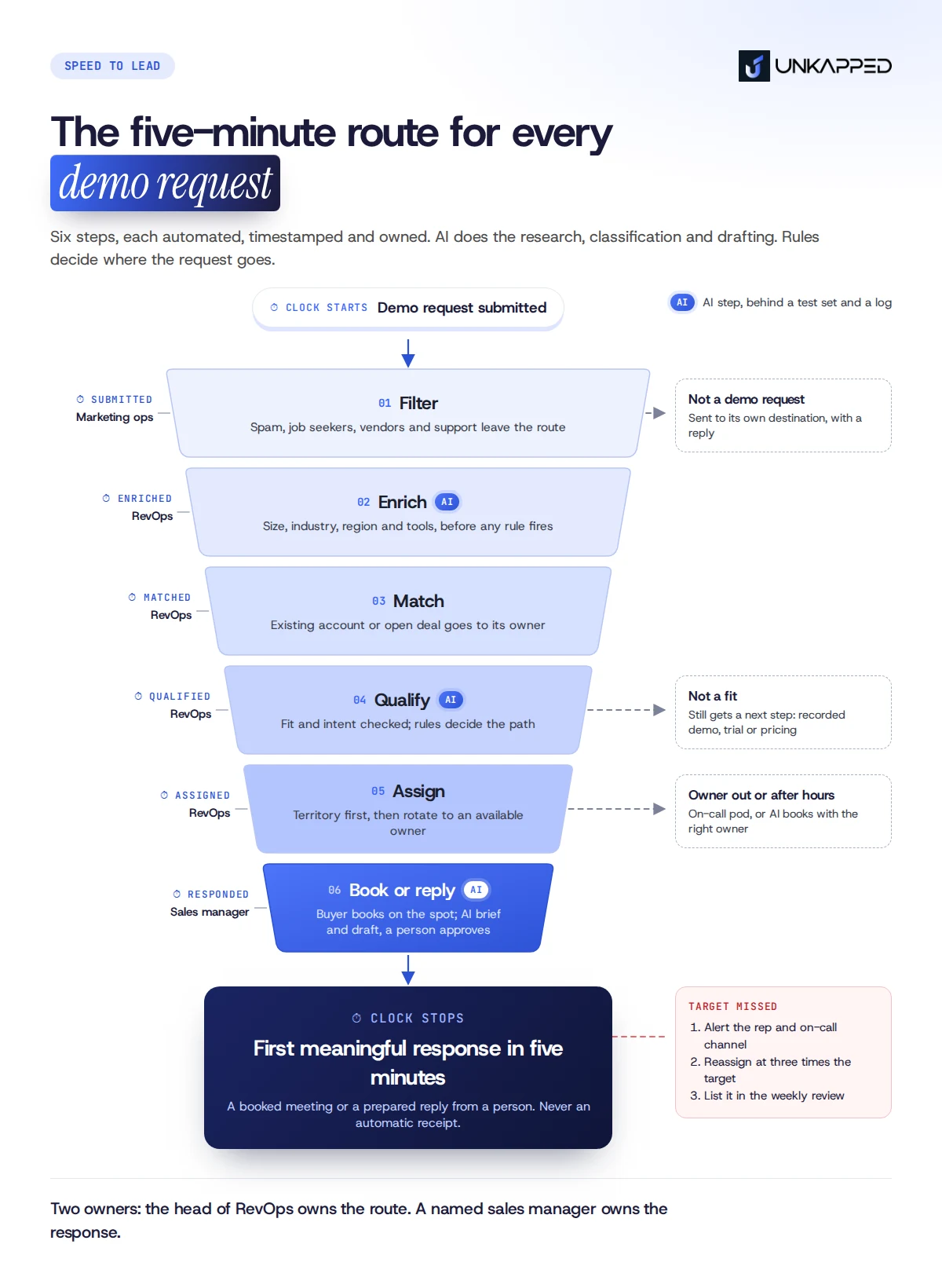
Run every demo request through one ordered path. Filter spam, enrich the record, match it to an existing account or open deal, check fit and intent, assign it to an owner who is available, then let a qualified buyer book a time on the spot. Every step is automated, timestamped and owned.
Inbound lead routing protects speed to lead when the order is fixed and every exit is defined. These lead routing best practices are the decision order we use:
- Filter. Remove spam, job seekers, vendors and support requests before routing. Send each to its own destination with a reply. Owner: RevOps.
- Enrich. Add company size, industry, region and existing tools before any rule fires. Rules that run on a blank record misroute it. Owner: RevOps or GTM engineering.
- Match. Look for an existing account and an open opportunity on the domain. An owned account goes to its owner; an open opportunity goes to the opportunity owner. Owner: RevOps.
- Qualify. Check fit against the ideal customer profile and the request type. A demo request from a fit account takes the fast path. Owner: RevOps, with the definition agreed by sales leadership.
- Assign. Apply territory or segment rules, then rotate within the pool, skipping anyone marked unavailable. Owner: RevOps.
- Book or respond. Show qualified buyers the owner's calendar on the thank-you page and send the rep the record with its context. Owner: sales manager.
- Close every other exit. A request that fails qualification still gets a useful next step: a recorded demo, a group session, a trial or the pricing page. Clay's test found silence was the most common response, so close this exit deliberately. Owner: marketing operations.
Lead assignment rules in the CRM can run steps 3 to 5 for a simple team without hurting speed to lead. A routing tool earns its cost when matching gets complex, when you need booking on the form, or when the rep pool is large enough that availability changes hourly.
Should a demo request go to an SDR or straight to an AE?
Send a qualified demo request from a fit account straight to the account executive (AE) who owns the account, or to the AE pool. A sales development representative (SDR) step adds a handoff that costs speed to lead, for a buyer who has already asked to talk to sales.
An SDR first still makes sense in three cases: the account is unknown and the fit is unclear, request volume is high enough that AEs would spend their week qualifying, or the source is a partner with its own process. Write the rule down either way. Two published routing guides from Ziel Lab and GTME Agency reach the same conclusion for high-intent requests from enterprise-sized accounts.
What happens after hours, when the owner is out, or when nobody responds?
Write the fallback before you need it. Route around reps marked out of office, cover evenings and weekends with an on-call pod or an AI step that books the meeting, and escalate any demo request that has not had a meaningful response within the service level.
LeanData points out that weekend and evening requests disappear from average speed to lead reports because nobody is watching when they wait. The escalation ladder below is the starting point we would set, then tighten against your own baseline:
- At the service-level target, alert the assigned rep and the on-call channel.
- At three times the target, reassign to the next available owner and notify the original one.
- At the next review, list every request that reached step 2, with the stage where it stalled.
Send any record that fails routing twice to an exception queue owned by RevOps, and report the age of the oldest item in it.
How does AI lead routing make five minutes reliable?
AI makes the first response to a demo request prepared as well as fast. It enriches and researches the account, separates real demo requests from noise, drafts the rep's first reply, and books meetings after hours. Rules still decide where the lead goes, and each AI step runs behind a test set and a log.
AI automation is the growth lever for speed to lead for one reason: it closes the gap Clay found between fast and personal. A template can go out in seconds; a researched reply takes a person time. When an AI step has already written the account brief by the time the rep opens the record, the rep's first reply can be both. That is coverage and preparation on every request, without adding SDR headcount. More than 50 companies in Clay's test ignored the agents' phone number and called the buyer's real number. Those teams had enriched the lead before dialling, and that is the behaviour speed to lead automation should make standard.
The Telfer finding supports the same point from the other side. If a prepared call at 20 minutes beats a rushed one at two, the job is to make preparation take two minutes. That is what AI lead routing is for.
Keep three decisions away from AI: disqualifying a named target account, quoting a price, and changing an account's owner. Each one costs more when it is wrong than a few minutes of human review costs when it is right. Automated lead routing decides fast; a person decides anything a buyer or a quota would dispute.
What review gates should an AI step pass before it touches a demo request?
Three gates: a test set of past demo requests with agreed correct outputs that the step must pass, a person approving any message or data change a buyer will see, and logs a reviewer can audit. Add a fallback to the rule-based route for when the AI step fails or times out.
Build the test set from last quarter's demo requests. For classification, label each request with the correct type. For research, check the facts in a sample of briefs against the company's own site. Run the AI step against the set before it goes live and after every prompt or model change.
Set approval by action. Booking a meeting from a rule-chosen calendar can run unattended once the logs look clean. A personal email in a rep's name needs the rep's approval. Our applied AI work uses the same pattern for every agent: test sets, evaluations and review gates before anything runs on its own.
TL;DR: AI improves speed to lead by making the first response to a demo request prepared as well as fast, by researching, classifying and booking in minutes. Put each AI step behind a test set, an approval rule and a log, and keep rules in charge of where the lead goes.

Who owns speed to lead, and what does the service level say?
Speed to lead needs two owners and one service level. The head of RevOps owns the route and its uptime. A named sales manager owns the response. The service level writes down when the clock starts and stops, the target for demo requests, the hours it covers, the escalation and the weekly review.
Splitting ownership matches the split in the speed to lead clock. Processing time belongs to the person who can change the route. Rep time belongs to the person who manages the reps. When one team "owns speed to lead", each half blames the other, and the weekly number improves only when someone happens to look.
The table holds the fields to write down.
A speed to lead service level that exists only on paper is common. A Ziel Lab author describes pulling the data at a 30-rep sales team: a median of 4 hours 18 minutes to first contact on demo requests, against a one-hour promise on the form and a one-hour target in the CRM. The fix is not a stricter target. It is a named owner and a weekly review that reads the timestamps.
How do you track speed to lead without fooling yourself?
Track speed to lead from the buyer's clock to the first meaningful response, and report the median, the 90th percentile and the share of requests that never got a response, by lead type and by covered hours. Averages hide the weekend, and they leave out the requests nobody answered.
Start speed to lead reporting with coverage. Clay's test showed that the largest loss is the request that never gets a reply, so the first number on the weekly report is the never-responded share for demo requests.
Then report lead response time as the median and the 90th percentile (P90, the time within which 90 per cent of requests got a response). LeanData gives the reason: a team with a six-minute average can still have one request in five waiting 45 minutes or more. Split each number into processing time and rep time, and separate covered hours from after hours.
Add time to booked meeting, because that is what the buyer experiences. Then compare outcomes by response band, under five minutes, under an hour and later, as a signal rather than proof. Fast requests and good outcomes appear together for many reasons, and the leads you answer fastest may simply be better leads. Treat the comparison as a prompt to look closer, and never promise conversion from a faster speed to lead number.
TL;DR: A speed to lead number is only honest if it starts on the buyer's clock and counts the requests nobody answered. Review the median, the P90 and the never-responded share weekly, by lead type and covered hours.
What do published routing structures show?
Published routing structures get the route right and the speed to lead clock and owner wrong. We read six structures that agencies, consultancies and practitioners have published. All automate enrichment and assignment. Few start the clock at submit, few name who owns the response, and none of the parts we read describes a test set or approval step for its AI.
We read each structure against the four parts of speed to lead in this guide: clock, route, owner and fallback. The table records what each publishes, not how its authors run it in practice.
Three patterns stand out.
The clock starts late or stops early. Three structures start the timer at assignment or CRM creation, which leaves sync, enrichment and matching time out of the number the team reviews. One treats an automatic email in the rep's name as the first touch. On Clay's evidence that is the reply buyers already receive in seconds and rarely value, so the five-minute human reply is the number to report.
The route is the strong part. Every structure matches existing accounts or open deals before rotating, and most enrich before routing. A team that copies any of them gets a sensible decision order.
Ownership of the response is rarely written down. Directive names who owns routing. None names the person accountable when a routed request still waits. The fallbacks that exist are well designed, and they still need someone who reads the escalations each week.
What does a five-minute route look like in practice?
Here is the Friday request from the opening, before and after a speed to lead route. Illustrative example: every company, person and time below is invented to show the mechanics.
A 600-person cloud security company runs HubSpot. At 6:40 pm on a Friday, a security director at a 3,000-employee bank requests a demo. The bank is an existing account owned by an EMEA account executive who is on leave.
Before. The request lands in a shared inbox and the owner's notifications. Nobody covers Friday evening. The first reply goes out at 9:30 am on Monday, 63 hours later, and it opens with questions the CRM could have answered.
After.
- At 6:40 pm the form tool timestamps the request. Within a minute the record is enriched, matched to the bank's account, and flagged as a demo request from an owned account whose owner is out.
- The fallback rule assigns the on-call AE pod. The thank-you page shows the pod's open times, and the director books Monday at 10 am.
- The AI research step writes a one-page brief: the bank's security team, recent public announcements, and the existing account history.
- The AI drafts a personal reply from the brief. The on-call AE reads it on a phone, edits one line and sends it at 6:44 pm. The original owner is added to Monday's meeting.
- On Monday the weekly review reads the timestamps: a speed to lead of four minutes to a prepared reply, a meeting booked, no escalation.
The buyer got a booked meeting and a reply that showed the company knew who they were. No rep worked on Friday night beyond reading and approving one email.
When is five minutes the wrong target?
Five minutes is the wrong speed to lead target when the lead is not a demo request, when a rushed reply would be worse than a prepared one, or when the buyer has already booked a time. A five-minute speed to lead target is a service level for high-intent requests in covered hours, not a rule for every form.
The strongest case against the five-minute rule is the Telfer study. Its preliminary results found won outcomes three times more likely when first contact came at 10 to 60 minutes rather than in the first ten. The study describes these as preliminary results, with a full report due in 2018. Taken at face value, the finding argues against a rushed, unprepared reply, and we agree with it. It does not argue for waiting. The answer is to make preparation fast, which is the job the AI steps above do.
Other lead types need other speed to lead targets. A content download, a webinar sign-up and an event badge scan carry less intent than a demo request, and LeanData's tiers put them at an hour, the same day and several days respectively. Product sign-ups should be scored for fit and usage before they enter the demo route at all.
What would change our mind: published B2B data showing that buyers book less often after an AI-prepared first reply than after a reply written entirely by a person, or that they penalise contact within minutes. We have not seen either.
What is lead routing?
Lead routing is the set of rules that decides which person or team receives a new lead, and it sets the ceiling on speed to lead. For demo requests it runs in a fixed order: filter, enrich, match to an existing account, qualify, assign to an available owner, then book or notify. Good lead routing also closes every other exit, so no request goes unanswered.
What is the best lead routing software for speed to lead?
The best lead routing software is the one your situation needs. Native HubSpot or Salesforce routing handles a small pool with simple territories. LeanData, Chili Piper, Default or RevenueHero add complex account matching and booking on the form. Clay or n8n fit custom enrichment and AI steps. We take no margin on any software, so no commission sits behind this advice.
Is round robin lead assignment enough for demo requests?
Round robin lead assignment is enough only as the last step. It belongs after a check for an existing account owner, after territory or segment rules, and it must skip anyone who is out. Plain rotation ignores absence and capacity, so demo requests land with reps who cannot answer them and speed to lead suffers. Weighted rotation within an available pool works better.
How do you set up lead routing in HubSpot or Salesforce?
In HubSpot, lead routing for speed to lead runs in workflows: if/then branches for matching and territory, the rotate action for the pool, and a delay step that checks for a logged response and escalates. In Salesforce, one active assignment rule handles ownership, and a Flow handles the timer and escalation. Add a routing tool once account matching outgrows native rules.
Does an automated reply count as speed to lead?
An automated reply counts as speed to lead only if it answers the request or books a meeting. A receipt does not. In Clay's 2026 test, 64 per cent of replies were automated and almost none were personalised, while most personal replies came a day later. Set the clock to stop at a booked meeting or a prepared reply.
Can an AI agent handle the first response to a demo request?
An AI agent can handle the first response, and improve speed to lead, when the response is a booking with a rule-chosen owner, or a reply a person approves before it is sent. Let it research, classify and draft; keep a person on anything sent in a rep's name. Automated phone calls also need the buyer's consent under the rules where they live.